



Short Summary
Medusa v2 separates incoming requests, business steps, and data management into clear layers. Modules own their features, workflows coordinate changes, and links connect related records without breaking module boundaries.
A team wants to add brand information to its product catalog. The task looks small, yet developers must decide where brand data belongs, how products connect to it, and how other systems read it.
Putting everything in one place is the fastest start. Over time, tightly connected features become hard to change, because a small edit to brand fields can break product logic elsewhere.
The Medusa v2 architecture solves this by separating modules, workflows, and data relationships. This article explains each part, shows how they cooperate, and follows one product-brand example from request to response.
What Is Medusa v2 Architecture?
Medusa is a headless commerce platform. The storefront is the customer-facing application, while Medusa runs the commerce backend: catalog, carts, orders, and the rules behind them. The two communicate through APIs.
Medusa is also a framework, not only a set of APIs. Its architecture layers API routes, workflows, modules, and a PostgreSQL database, so developers can extend commerce features without rewriting core behavior.
In practice, the layers are simple to name. API routes receive requests, workflows run business operations, modules own domain data, and Medusa’s container wires these parts together at runtime.
How a Request Moves Through Medusa v2
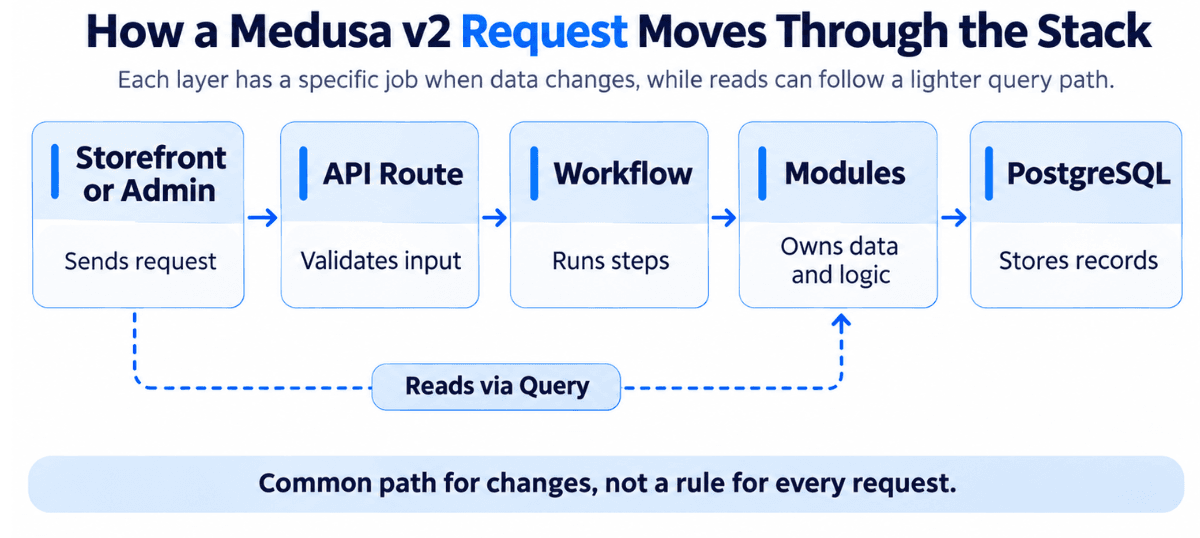
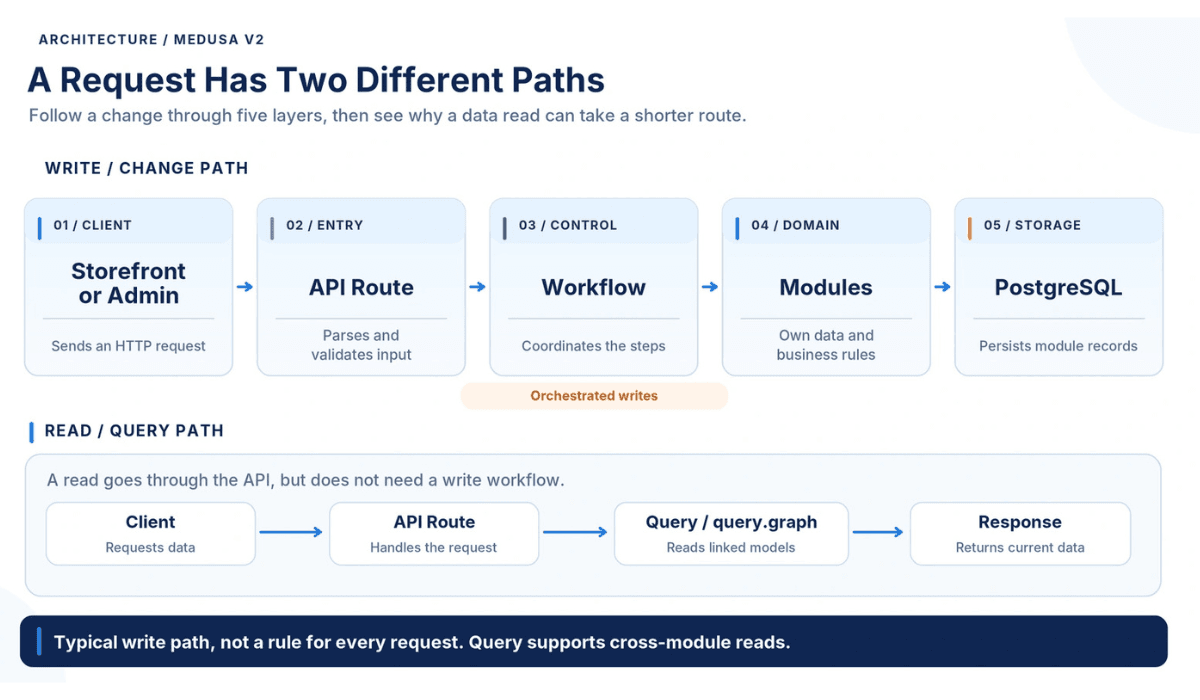
A common business operation in Medusa follows one path. Each layer has one job, which keeps responsibilities separate and easier to maintain.
- Storefront or Admin: sends a request to an endpoint.
- API route: receives the request, validates input, starts a workflow.
- Workflow: runs ordered steps for the business operation.
- Modules: own the data models and services each step uses.
- Data store: PostgreSQL saves the records modules manage.
This is a common path for changes; reads can use Query directly, and events trigger later follow-up actions.
How Medusa Modules Keep Features Separate
A module is a separate area of functionality with one job. It bundles data models, which define database tables, and a service, which holds the logic for reading and changing that data.
Module isolation means one module cannot reach into another module’s internal resources. The Cart Module cannot query Product tables directly, so a change inside Product does not silently break Cart code.
Isolation also helps teams work independently. Brand developers can change their own service and data models, while product code keeps working through the interfaces Medusa provides.
Commerce Modules and Custom Modules
Commerce Modules, such as Product, Cart, Customer, and Order, ship with Medusa. A custom module follows the same structure for your own needs. A Brand Module can own brand records without editing the Product Module’s internals.
How Medusa Workflows Coordinate Business Operations
A module manages its own domain. A workflow coordinates actions that may touch several modules. Creating a brand and attaching it to a product, for example, needs more than one module.
Each workflow is built from steps. A step does one task, such as saving a brand. Steps can define a compensation function, which undoes that step’s work if a later step fails.
Compensation only works when you write it. Medusa cannot reverse an external action without your logic. Subscribers differ: they react to events afterward, so they suit work that need not finish first.
A Workflow Step in Practice
In the brand example, one step creates the brand record and returns it. A second step links that brand to a product. If the second step fails, the first step’s compensation can delete the brand.
How Module Links Connect Data Across Modules
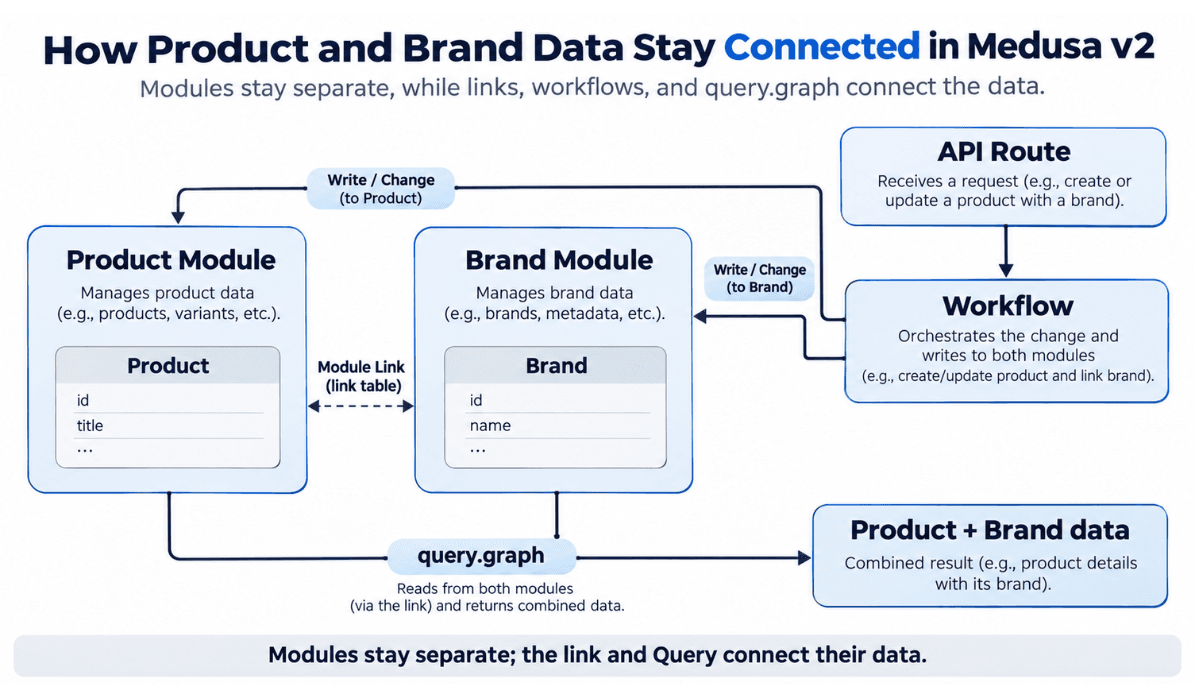
Isolation creates a question: how does a product point to its brand? A Module Link answers it. It defines an association between data models that belong to two different modules.
You define the link in code, and Medusa stores the association in a separate link table. Neither module changes, and no brand data is copied into Product. Each module keeps its own records.
A link is not an ordinary relationship inside one module, where tables share a foreign key. Links cross module boundaries on purpose. When both records belong to one module, a normal relationship is simpler.
Linking Records Versus Retrieving Them
The Link utility creates and removes associations, such as connecting one product to one brand. Query retrieves the connected data. With query.graph, you request product fields plus brand fields, and Medusa resolves the link.
A Practical Example of Medusa v2 Architecture
Consider a retailer that wants to manage brands separately and attach them to products. This is a conceptual walkthrough of documented Medusa patterns, not a production implementation or measured result.
| Step | Component | Responsibility |
|---|---|---|
| 1 | Brand Module | Stores brand records |
| 2 | Module Link | Connects brands to products |
| 3 | API route | Accepts the create-brand request |
| 4 | Workflow | Runs steps for multiple changes |
| 5 | Query | Reads products with brand data |
Creating a brand and linking it to a product changes data in several places. A workflow groups those steps, handles failure, and keeps the route small.
Not every attribute needs this. If brand is only a simple label, product metadata may be enough. A custom module earns its place when brands need their own fields, rules, or lifecycle.
Reading Brand Data with Query
To show product pages with brand names, call query.graph on the product entity and request the brand fields through the link. This read needs no workflow, because nothing changes, and Medusa returns the combined result.
Where Should Custom Logic Go in Medusa?
Use this table to match each requirement to the right component. It summarizes responsibilities only, because earlier sections already explained how each concept works in detail.
| Component | Use it for | Example |
|---|---|---|
| API route | Exposing an endpoint to clients | POST /admin/brands |
| Module | Owning a domain’s data and logic | Brand records |
| Workflow | Coordinating multi-step changes | Create brand with product |
| Module Link | Associating records across modules | Product to brand |
| Subscriber | Reacting to events afterward | Notify search index |
A simple extra attribute does not always need a custom module. Ask whether the data has its own rules or lifecycle; if not, existing fields or metadata keep the design smaller.
Common Architecture Mistakes to Avoid
Placing complex business logic inside API routes makes it hard to reuse and test. Move multi-step logic into a workflow, so routes only validate input and start it.
Another mistake is reaching into another module’s internal models. It breaks isolation and couples code to details that may change. Use a Module Link and Query instead.
Events also need care. A subscriber runs after the original operation, so it should not hold work that must complete with it. Likewise, avoid linking records that belong in one module, or building modules that existing features already cover.
What Makes Medusa v2 Architecture Useful?
Clear responsibilities make behavior easier to trace. A business rule lives in a workflow, domain data lives in its module, and relationships live in links, so developers know where to look.
Integrations benefit too. A subscriber or workflow can connect an external system without changing module internals, so outside services stay at the edge of the design.
Modular design still needs judgment. Wrong boundaries add complexity, such as extra links or fragmented logic. Storefront choices, inventory integration, migration, and deployment each deserve separate technical analysis. Teams needing hands-on support can explore Medusa.js Development Services.
Final Takeaway
Modules manage individual areas of functionality. Workflows coordinate operations. Module Links connect related data, and Query helps retrieve that data. Keeping these four jobs separate is the core idea behind Medusa v2.
When reviewing any Medusa implementation, pick one feature and trace it. Ask which module owns the data, which workflow changes it, and how Query reads it. Unclear answers can reveal design problems.

SUKHPREET SINGH
I'm Sukhpreet Singh, Director of Innovation & Technology at Gyan Solutions. With 8+ years in generative AI and ERP integration, I build AI-powered decision-support systems that adapt to real operational complexity without replacing existing infrastructure.





