


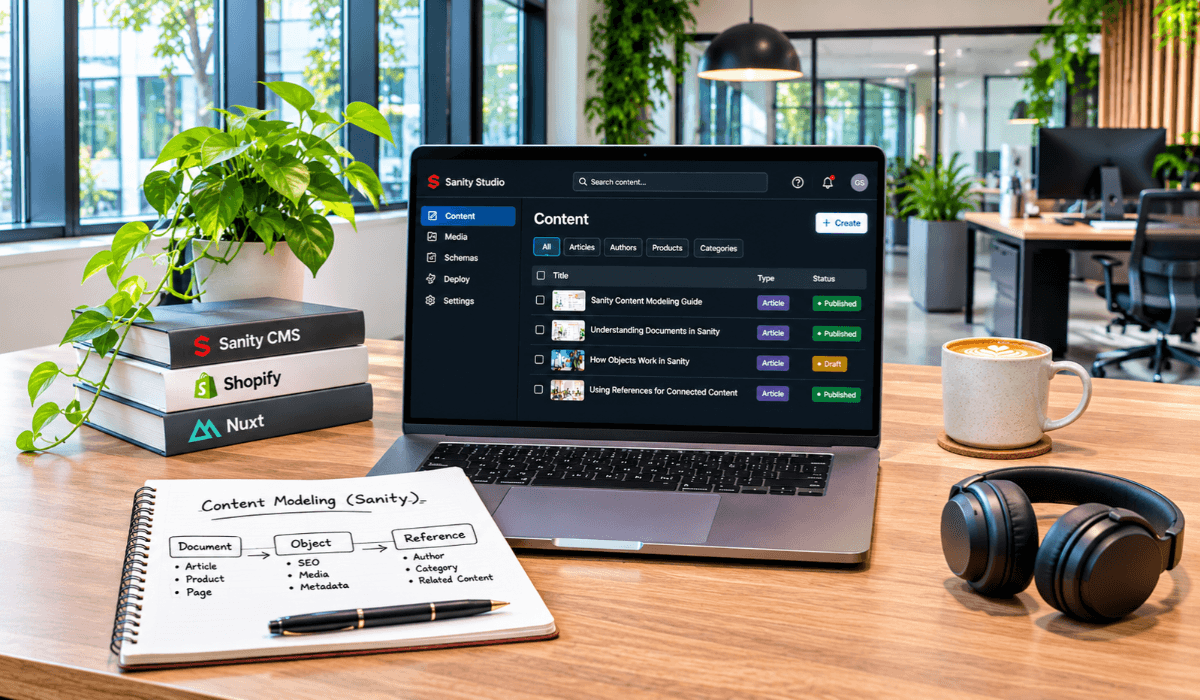
Short Summary:
Sanity content modeling defines which information becomes a document, stays inside an object, or connects through a reference. Choosing correctly makes content easier to edit, reuse, and maintain across websites and apps.
Your editor updates an author’s job title, then discovers the old title still appears on forty articles. Nobody made a typing mistake. The content model copied one fact into every record, and now every copy needs fixing.
Sanity content modeling decides whether information is shared or duplicated. Choose the wrong structure, and teams repeat the same edits, struggle with confusing relationships, and find even small website changes and redesigns slow, risky, and unexpectedly expensive.
This guide explains documents, objects, and references in plain English using one running example. You will learn what each structure does, when to choose it, which mistakes to avoid, and how to test a model before building.
What Is Sanity Content Modeling?
A content model describes the kinds of information your organization manages and how those pieces relate. In Sanity, you define it with schemas, which set document types, fields, and the forms editors use every day.
Structured content describes meaningful information, not page layouts. An author, an article, and a category are real things your team manages. A homepage hero is only one place where that information might appear. Modeling the thing lets pages reuse it.
Think of the model as a blueprint for your information, not a sketch of one website. If the blueprint matches how your team works, editing feels natural. If it mirrors a single design, every redesign forces content changes.
What Is a Document in Sanity?
A document is a standalone record in your dataset. It has its own ID, a revision, and timestamps, so editors can find, update, and publish it independently of any single website page or app screen.
Take an author profile. It holds a name, biography, photo, and social links. Because the profile exists on its own, many articles can use it, and the team updates it once instead of forty times.
A useful test: would someone ever search for this content, edit it alone, or reuse it elsewhere? If yes, it probably deserves its own document, whether or not it ever becomes a page on your site.
What Is an Object in Sanity?
An object groups related fields inside a parent document. By default, an object cannot exist as a standalone document. It lives within the record that contains it, like a labeled folder inside a file.
SEO metadata is a good example. A title, description, and share image belong together, so you define them once as an object type and add that group to any document that needs it, such as articles or case studies.
Reusing an object schema does not share the stored content. Each article keeps its own values, so a brand tagline stored in an object must be edited everywhere. Values that must stay consistent belong in a referenced document.
How Do References Connect Sanity Documents?
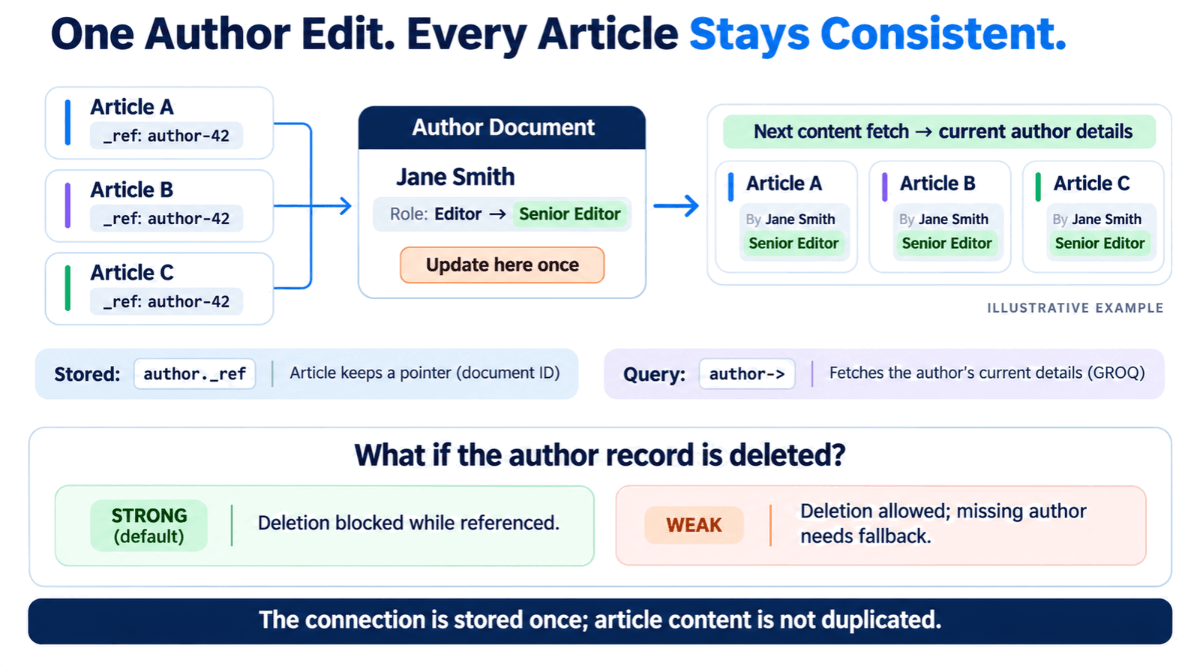
A reference stores a pointer to another document instead of copying its content. An article stores the author’s document ID, and a query can expand that pointer into the author’s current details when your site requests it.
If the author changes a job title, you edit one document. Every article that references that author reflects the update the next time its content is fetched. Nothing needs to be copied across records or corrected by hand.
Strong vs. Weak References
By default, references are strong: the target must exist, and Sanity blocks deleting a document that others reference. A weak reference allows missing or deleted targets, so published content may point to nothing and needs fallback handling.
Documents vs. Objects vs. References: Which Should You Use?
Choose by asking who manages the information and where else it appears. The table below turns that question into a quick guide for the three structures.
| Structure | Choose It When | Simple Example |
|---|---|---|
| Document | Content needs its own identity | Author profile |
| Object | Fields belong within one record | SEO metadata |
| Reference | One record connects to another | Article author |
The essential question is this: does the content need independent editing and reuse, or should it stay part of its parent document? Independent and shared content becomes a document with references. Parent-only content becomes an object.
The tradeoff is real. Objects keep editing simple because everything sits in one form. References give consistency but add another record to maintain and query, and strong references prevent that record’s deletion while it is in use.
Real-World Examples: Products, Events, and Pages
In an online store, a product is a document because teams search, review, and publish it individually. Its size and weight fit an object, while its brand is a reference to one shared brand document.
An event follows the same logic. The event is a document, its venue is a referenced document shared by many events, and its ticket details stay together as an object inside the event. A moved venue needs one edit.
A landing page that features the product is only a view of that content. The page can reference the product document, so campaign teams reuse the same details without copying descriptions, images, or specifications.
A Simple Sanity Content Model Example
Our example has three parts. An article is a document, an author is a separate document, and SEO metadata is an object stored inside each article. The article reaches its author through a reference.
import {defineType, defineField} from 'sanity'
export const seo = defineType({
name: 'seo',
type: 'object',
fields: [
defineField({name: 'metaTitle', type: 'string'}),
defineField({name: 'metaDescription', type: 'text'}),
],
})
export const author = defineType({
name: 'author',
type: 'document',
fields: [
defineField({name: 'name', type: 'string'}),
defineField({name: 'bio', type: 'text'}),
],
})
export const article = defineType({
name: 'article',
type: 'document',
fields: [
defineField({name: 'title', type: 'string'}),
defineField({name: 'author', type: 'reference', to: [{type: 'author'}]}),
defineField({name: 'seo', type: 'seo'}),
],
})
This snippet shows only the schema types. They must be registered in your Studio configuration before editors can use them, so this is a teaching example, not a complete, deployable project.
Notice the difference. The article and author are standalone documents. The seo field holds an object, so each article keeps its own values. The author field holds only a reference, so one author record serves every article.
Common Sanity Content Modeling Mistakes
Most modeling problems come from a few repeated habits. Each looks harmless at first but creates extra editing work, confusing relationships, or structures that are hard to change.
- Page-shaped document types: editors duplicate information for every layout
- Copying shared content: one update means many manual edits
- Making every small field group a document: editors manage needless extra records
- Using references where objects suffice: editors jump between records
- Deep nesting: forms become hard to scan and maintain
Spotting these early matters because each mistake becomes harder to correct once editors have filled the dataset with real content, and every correction can touch live records and website code.
Changing a Content Model Later: What Gets Harder
Changing a model is not like editing a template. Existing records keep their old shape until someone migrates them, so renaming fields or splitting groups usually needs a script and a careful review of live content.
Turning an embedded object into a document is a common example. You must create new records, merge duplicates, and replace every embedded copy with a reference. Starting with the right structure avoids that cleanup.
How to Plan a Content Model Before Building
Start by listing the things your team manages, such as products, authors, and campaigns, rather than the pages you plan to build. Note who edits each one and where it appears.
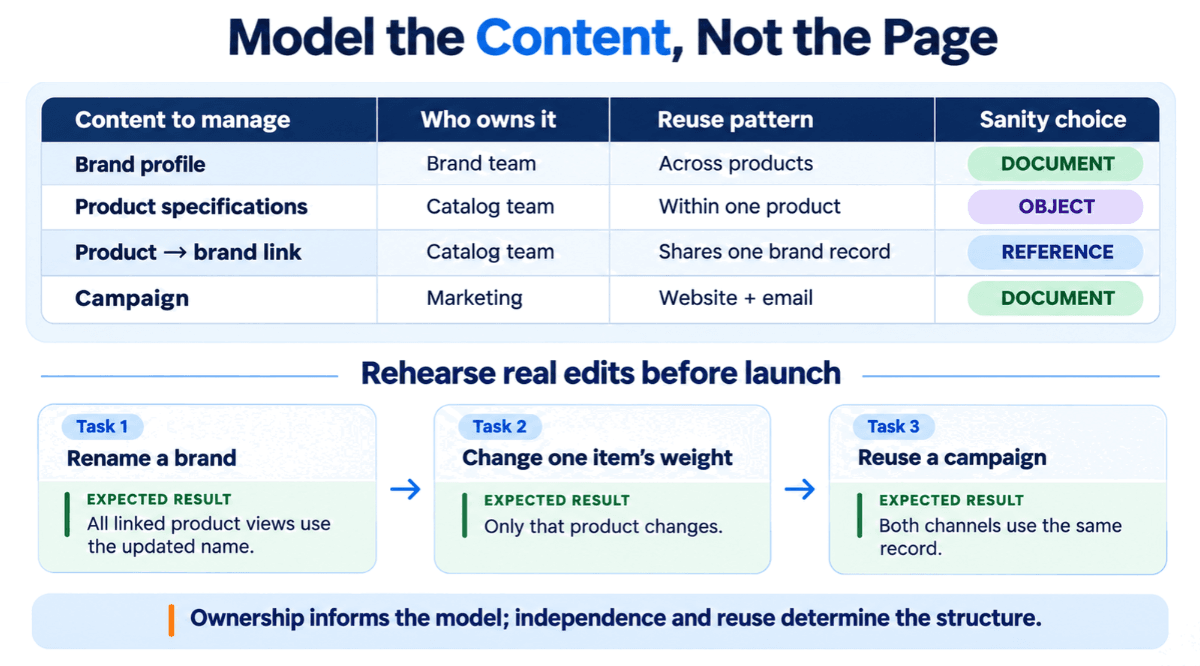
Then ask three questions about each piece. Does it need its own identity? Will several records use it? Does a different team edit it? Yes answers point toward documents and references; no answers suggest an object.
Test the draft model with realistic content before building the frontend. Entering a few dozen sample records often exposes awkward fields and missing relationships. For help reviewing content architecture, see our Sanity CMS implementation support.
Final Takeaway
Documents give content an independent identity. Objects keep related information together inside a parent record. References connect separate records without copying them. The right choice depends on how your team creates, updates, and reuses each piece of content.
To assess your current model, pick one value that appears on several pages, such as an author name or contact email. If editors must change it in more than one place, it likely needs to be a document.
Then plan one small change: move that value into a referenced document, update two pages to use it, and confirm editors can find it quickly.

SUKHPREET SINGH
I'm Sukhpreet Singh, Director of Innovation & Technology at Gyan Solutions. With 8+ years in generative AI and ERP integration, I build AI-powered decision-support systems that adapt to real operational complexity without replacing existing infrastructure.





