



Quick Summary
A Shopify to Medusa migration depends on accurate data mapping and planning. SEO protection and final synchronization matter just as much during cutover. Testing payments, inventory, redirects, and operations reduces avoidable launch risk.
A migration can look successful while quietly breaking sales, search visibility, or operations. Moving from Shopify to Medusa changes how commerce data and systems work together. That makes planning more important than the platform switch itself.
Established Shopify stores may hold products, customers, orders, inventory, discounts, and integrations. Their URLs can also carry years of organic search value. A strong migration protects data, SEO, and daily commerce during cutover.
Map Your Shopify Data Before Migrating
A Shopify to Medusa migration should begin with clear data mapping. Direct exports can create gaps because both platforms structure commerce data differently. That difference affects products, customers, orders, inventory, and related records.
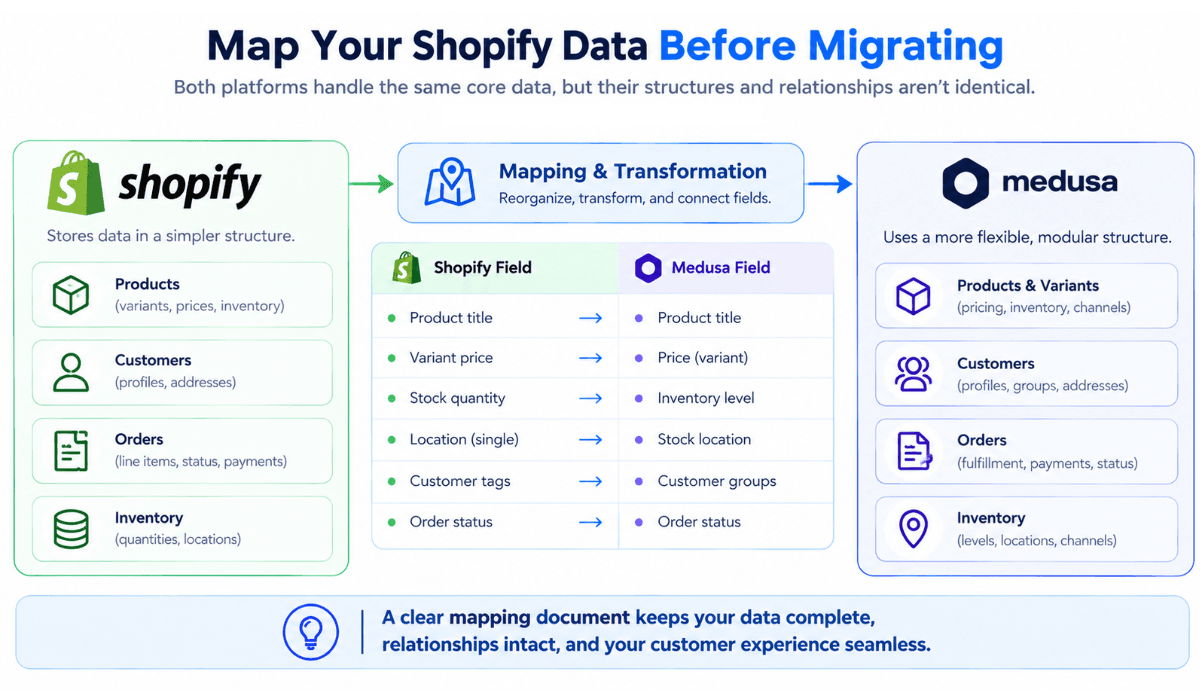
Shopify products may include variants, prices, inventory, and other connected details. Medusa also supports variants, but pricing, stock locations, and sales channels differ. Moving names and descriptions alone will not preserve the full buying experience.
Create a detailed mapping document before any migration work begins. It should show where each Shopify field belongs inside Medusa. It should also define how important relationships remain connected after migration.
Shopify-to-Medusa Data Mapping Checklist
| Shopify data | What to verify in Medusa |
|---|---|
| Products and variants | Product handles, options, SKUs, descriptions, images |
| Collections | Categories, collections, and product associations |
| Product prices | Currency, regional pricing, discounts |
| Inventory | Inventory items, stock locations, quantities |
| Customers | Profiles, addresses, identifiers, authentication |
| Orders | Historical records, line items, payments, fulfillment status |
| Discounts and gift cards | Supported promotions, balances, custom migration requirements |
| Metafields | Metadata, custom fields, or custom modules |
The migration method matters because Medusa’s Shopify migration documentation notes several CSV limitations. Inventory quantities, hosted images, and some category relationships may need separate handling. Larger stores may need API-based migration for better control.
Customer authentication and historical orders also require separate planning before launch. Existing passwords may not transfer, while order history needs more careful migration. Teams should also define access, refunds, fulfillment, and record handling after cutover.
Preserve Your SEO Before Changing Platforms
Protect Existing URLs
One major migration risk is losing visibility from pages already ranking in Google. Shopify often uses product and collection routes that differ from Medusa storefront URLs. Missing redirects can send users and search engines toward broken pages.
For example, an existing Shopify product URL might look like this:
- example.com/products/classic-leather-bag
A custom Medusa storefront may use a different route instead:
- example.com/shop/bags/classic-leather-bag
Without a permanent redirect, the original address can stop reaching that product.
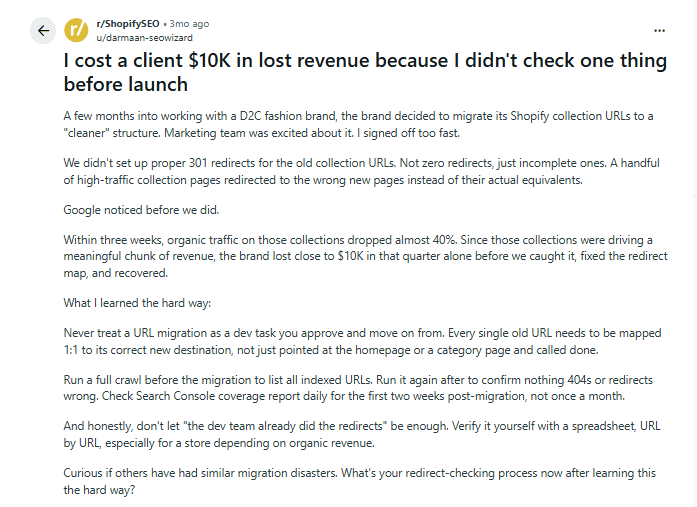
For example, Shopify’s /products/classic-leather-bag may become /shop/bags/classic-leather-bag inside Medusa storefronts. Google recommends mapping old URLs, using permanent redirects, and updating canonicals, links, and sitemaps. An August 2026 Reddit report showed how incomplete collection redirects preceded major traffic losses.
Preserve Important SEO Signals
Audit valuable URLs for traffic, backlinks, and important customer journeys before cutover. Preserve strong URLs where possible, otherwise redirect each toward its closest replacement. Medusa does not guarantee SEO; titles, canonicals, structured data, and navigation still need implementation.
Test the Store Before the Final Cutover
After migration, the real test is whether daily commerce still works. A store can look complete while important operational processes remain untested. Inventory, payments, shipping, and fulfillment must behave correctly after launch.
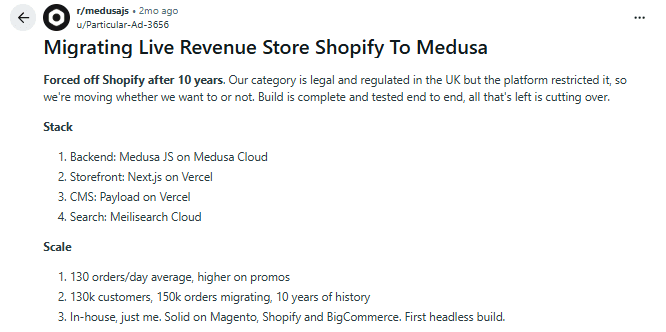
Connected services make this risk more serious during a live migration. In a September 2026 r/medusajs discussion, one operator described a large migration. The store handled about 130 daily orders, 130,000 customers, and 150,000 historical orders.
The operator had completed Medusa development but still questioned operational reliability. Deployment failures and independent service providers remained important concerns before launch. Before cutover, test the complete purchase journey using realistic customer conditions.
Final Cutover Checklist
- Verify migrated data: Reconcile key counts and test representative records.
- Complete SEO checks: Test redirects, canonicals, metadata, sitemaps, and indexing controls.
- Test transactions: Confirm checkout, payments, taxes, shipping, refunds, and order processing.
- Synchronize final changes: Reconcile new orders, customers, and inventory updates.
- Prepare the transition: Confirm Shopify cutoff, DNS, owners, and launch monitoring.
- Establish recovery procedures: Define responses for order, payment, inventory, and traffic failures.
Final synchronization matters because sales can continue after the first data import. If migration starts Monday and launches Friday, those changes need reconciliation. Busy stores may need a controlled final sync or temporary order freeze.
Monitor the New Store After Launch
A successful cutover does not end the migration or reduce operational risk. The first live days show how Medusa performs under real customer traffic. That evidence matters more than whether the homepage simply remains available.
Monitor failed payments, checkout errors, inventory differences, API failures, and fulfillment exceptions. Compare actual orders and revenue with expected trading activity after launch. Google Search Console should also track indexing errors and organic visibility changes.
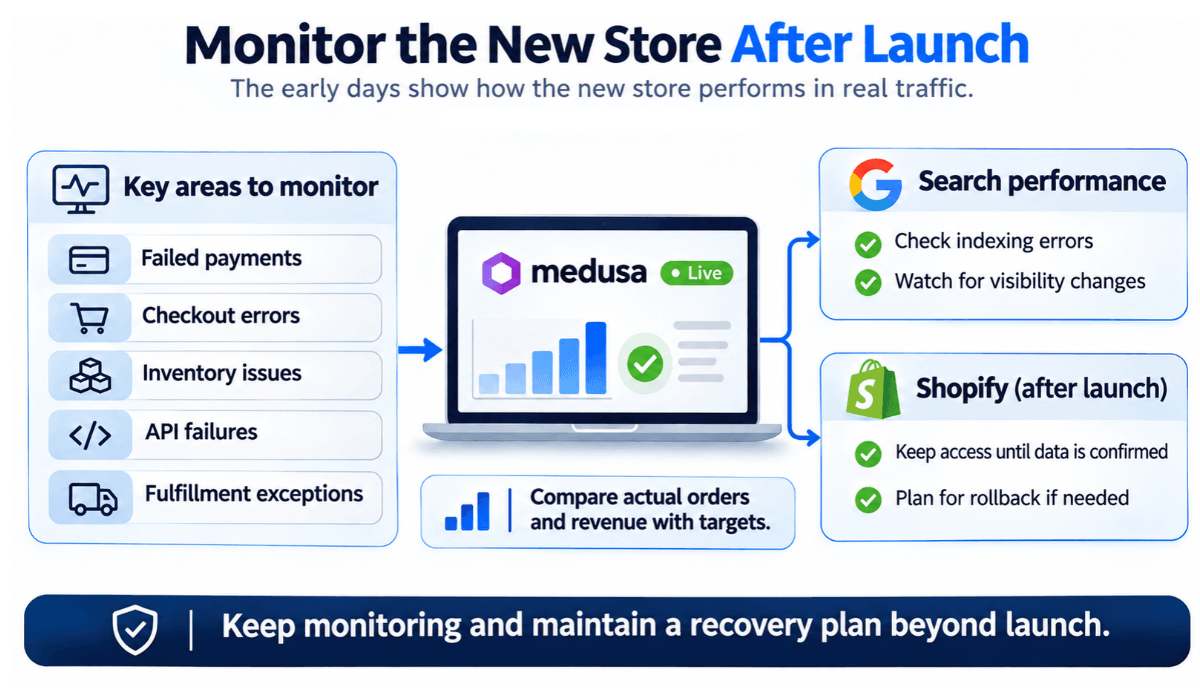
Keep Shopify available until required data and historical records remain confirmed. Rollback planning must also account for transactions already processed through Medusa. Larger stores should maintain monitoring and recovery procedures beyond launch day.
Conclusion: A Successful Migration Protects the Entire Business
Migrating from Shopify to Medusa can create a more flexible ecommerce environment. That value depends on careful planning across data, SEO, and operations. A successful transition protects what already works while improving the underlying commerce setup.
Accurate data mapping protects the information needed for daily store operations. SEO planning helps preserve visibility, while controlled cutover reduces transaction and inventory risks. The goal is not simply recreating Shopify inside Medusa.
At Gyan Solutions, Medusa development includes migrations, storefronts, integrations, and operational workflows. Planning these areas together gives businesses a clearer view of technical risks. It also supports better decisions throughout the migration process.

NATHAN ALLEN
I'm Nathan Allen, Director of Artificial Intelligence at Gyan Solutions. With 8+ years building AI systems, custom software, and cloud-native platforms, I deliver applications that scale reliably and drive measurable business outcomes.





